Templates overview
Write the emails and text messages your team sends from invoices, bookings and timesheets, with fields that fill in from the record.
A template is a message your team sends from a record — an invoice to a client, a booking confirmation, a reminder to a worker about a pending timesheet — written once, with fields that fill in from the record at the moment of sending. Templates come in two kinds today, Email and SMS; document templates are coming soon.
Open Templates from the sidebar (under the Communication group in the Staffing area).
Templates are not the automated notifications under Settings → Messages. Messages are the platform's own notifications — a shift assigned, a timesheet rejected — sent without anyone pressing a button. Templates are the messages a person composes and sends from a record. See Messages for the automated ones.
Who can do what
- Anyone who can see Templates can send from a template, duplicate one, and create Personal templates that only they can see and use.
- People with the templates permission (company administrators) also manage Company templates — create, edit, publish, set the default, archive — and see a template's Source tab. Everyone else opens a company template read-only, with a View only notice and the option to duplicate it as a personal copy.
System defaults
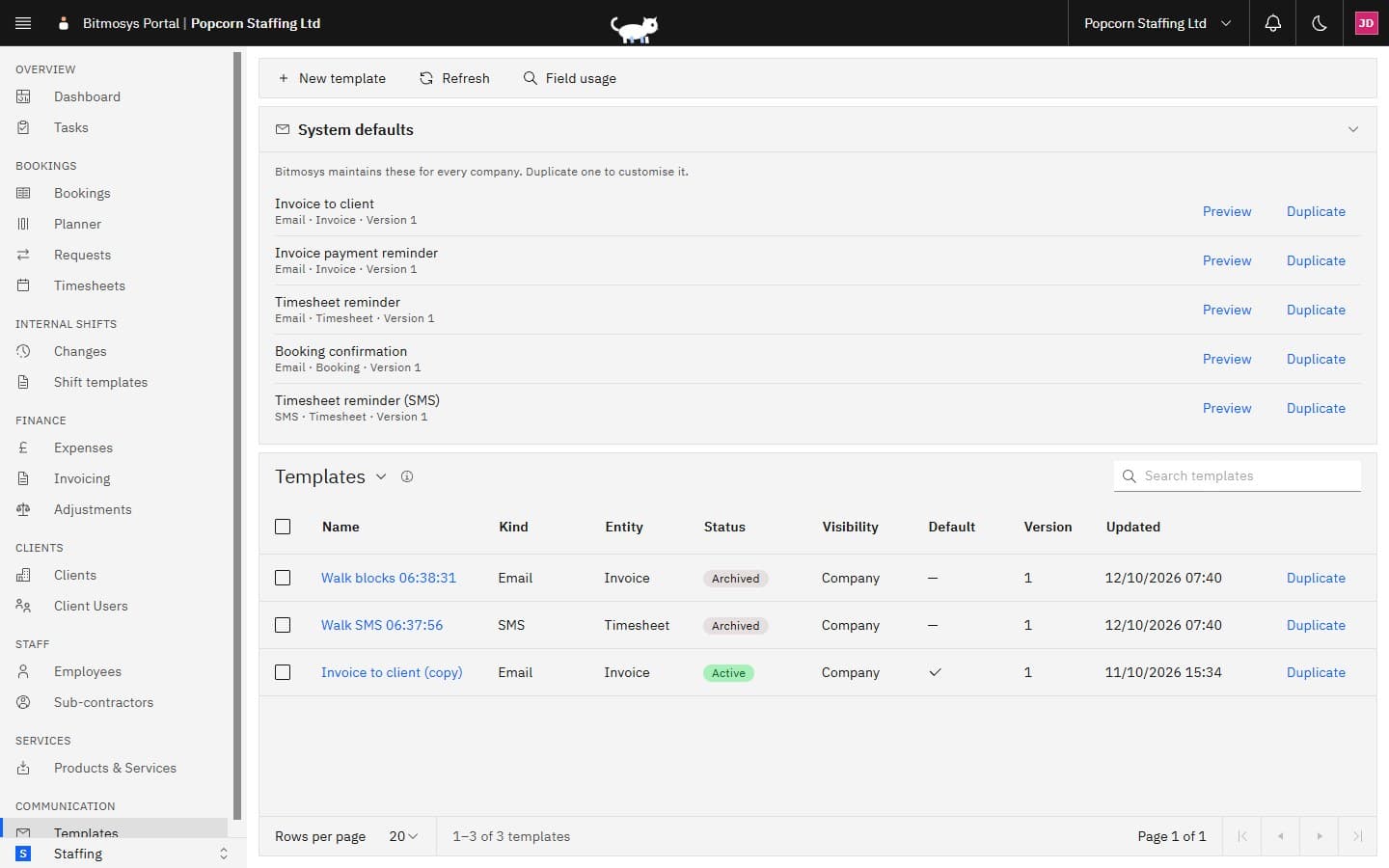
Bitmosys maintains a set of templates for every company, so you can send from day one without writing anything. They're listed under System defaults at the top of the page. Preview shows one filled with sample data; Duplicate makes an editable copy of your own.
System default | Kind · record | What it does |
|---|---|---|
| Invoice to client | Email · Invoice | Sends an invoice to the client's contact with the invoice PDF attached. |
| Invoice payment reminder | Email · Invoice | Reminds the client's contact that an invoice is due or overdue, with the invoice PDF attached. |
| Timesheet reminder | Email · Timesheet | Reminds the worker that a timesheet is still pending and asks them to complete and submit it in the staff app. |
| Booking confirmation | Email · Booking | Confirms the booking to the client's booking contact: the service, where and when, and who is booked. |
| Timesheet reminder (SMS) | SMS · Timesheet | Texts the worker that a timesheet is still pending and asks them to submit it in the staff app. |
A system default is what sends whenever you have no default template of your own for that kind and record type. You can't edit or archive a system default — duplicate it and customise the copy, then set the copy as your default.
The Templates list
Each row is one of your company's templates (plus your own personal ones).
Column | What it shows |
|---|---|
| Name | The template's name. Click it to open the template page. |
| Kind | Email or SMS. |
| Entity | The record type it's written for — Invoice, Timesheet, Booking… |
| Status | Draft, Active or Archived (see below). |
| Visibility | Company (everyone can use it) or Personal (only you). |
| Default | A tick when this template is used first for its kind and record type. |
| Version | The latest published version number. |
| Updated | When it last changed. |
Every row has a Duplicate link. Type in the Search templates box to find one by name. Tick rows to open the batch bar, where you can Archive the selection or Set as default (one template at a time). The arrow beside the list title switches between saved views — see Working with lists.
The command bar has New template, Refresh and Field usage (which templates mention a given field — see Fields reference).
Statuses
Status | Badge | Meaning |
|---|---|---|
| Draft | Grey | Never published. You can send from it only after it's published. |
| Active | Green | Published at least once — the latest published version is what sends. Edits made since are a draft on top until you publish again. |
| Archived | Warm grey | Retired. It can't be edited, published or sent from; duplicate it to work on a copy. |
Two more tags can appear beside the status: Default (used first for its kind and record type) and Personal (visible only to its owner).
Record types
A template is written for one record type, chosen when it's created and fixed from then on. Invoice, Timesheet and Booking records have fields and a send action today — see Sending from a template. The other record types in the picker (Shift, Worker, Client, General) are listed ahead of their send actions and have no fields yet.
Next steps
- Writing a template — the editor, fields, the live preview, publishing and versions.
- Blocks and tables — show a paragraph only when a condition holds, repeat a block for every invoice line, and lay content out in tables.
- SMS templates — text messages and the segment counter.
- Sending from a template — the compose sheet from an invoice, a booking or a timesheet.
- Fields reference — every field, by record type.