SMS templates
Write text-message templates, keep an eye on the segment counter, and send a timesheet reminder by SMS.
An SMS template is plain text with fields — no subject, no formatting, no attachment, and no blocks or tables. Create one with New template and Kind set to SMS; the record type with an SMS send action today is Timesheet.
The system default Timesheet reminder (SMS) texts the worker that a timesheet is still pending and asks them to submit it in the staff app. Duplicate it to write your own wording.
The editor
The body is a single text area with the Insert field button (or type {).
Line breaks are kept. Under the body a counter reads back how the message
measures with sample data, for example:
142 characters · 1 segment · GSM-7
- Characters is the length after the fields are filled in with sample values — real records may be a little longer or shorter.
- Segments is how many text messages the carrier will send and bill. A message in the standard GSM-7 alphabet fits 160 characters in one segment, then 153 per segment after that.
- Unicode appears instead of GSM-7 when the text contains a character outside the standard alphabet — an emoji, curly quotes, some accented letters. Unicode messages carry only 70 characters per segment (67 when split), so one stray character can double the cost. Replace it and the counter goes back to GSM-7.
The counter turns red past 1,600 characters, and a template over that length can't be published. The Preview shows the plain text as the worker will read it.
Sending by SMS
On a Pending timesheet, Send reminder by SMS (in the ⋯ menu of the timesheet's page) opens the compose sheet in SMS mode: the template picker, To holding the worker's mobile number in international form (for example +447700900123), the message with its segment counter, and a plain-text preview. There's no subject, Cc, Bcc or attachment.
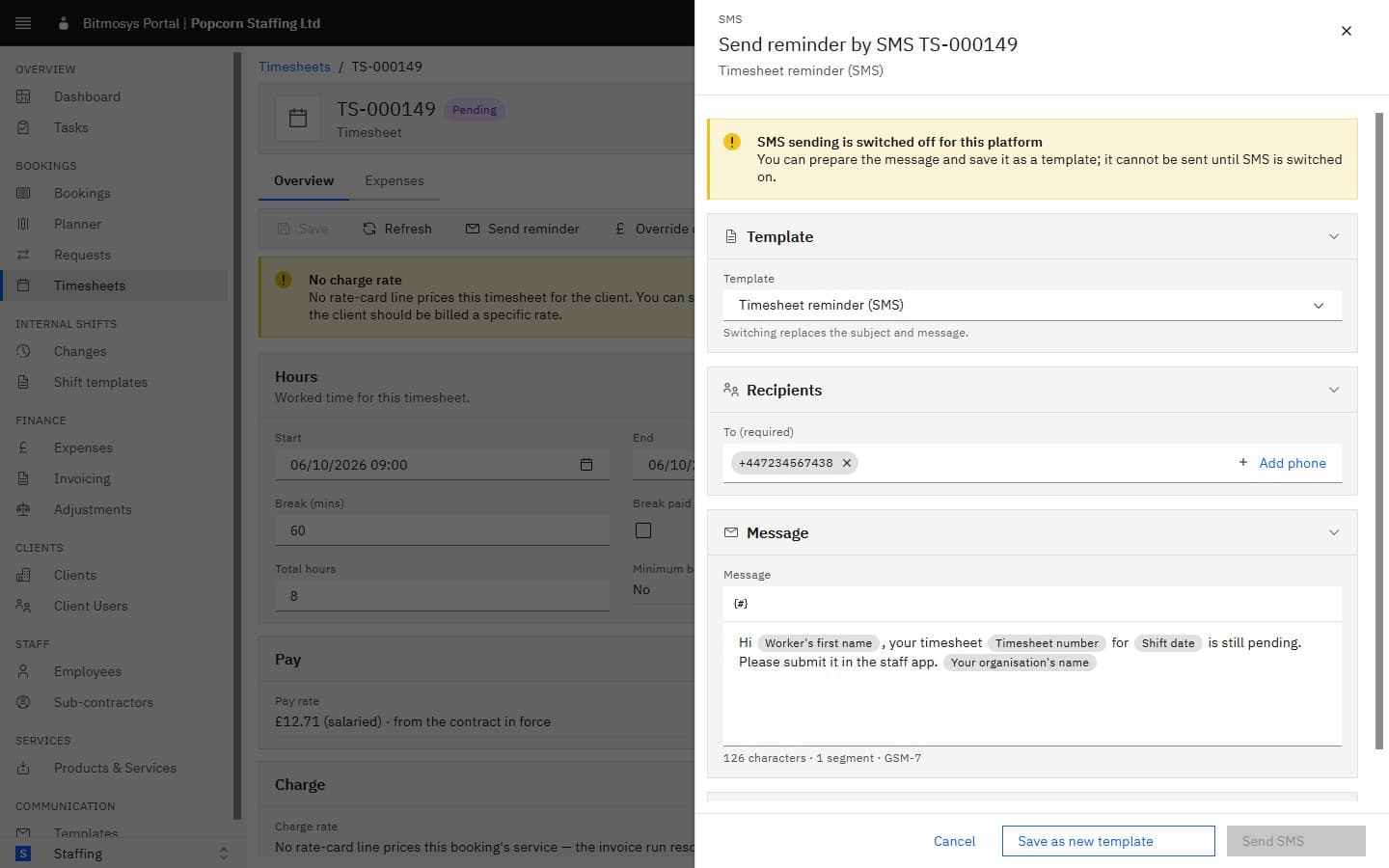
Until SMS is switched on for your platform the sheet shows SMS sending is switched off for this platform and Send SMS stays disabled — you can still prepare the message and Save as new template. Ask Bitmosys to switch SMS on when you're ready to text workers.
See Sending from a template for the sheet in full.