Blocks and tables
Show part of a message only when a condition holds, repeat a block for every item in a list, and lay content out in tables.
Email templates can do more than fill in fields. A Condition block shows its contents only when a test on the record passes; a Repeat block repeats its contents for every item in a list, such as the lines of an invoice; and tables lay content out in rows and columns. All three come from the editor toolbar. (SMS templates are plain text and have none of them.)
Condition blocks
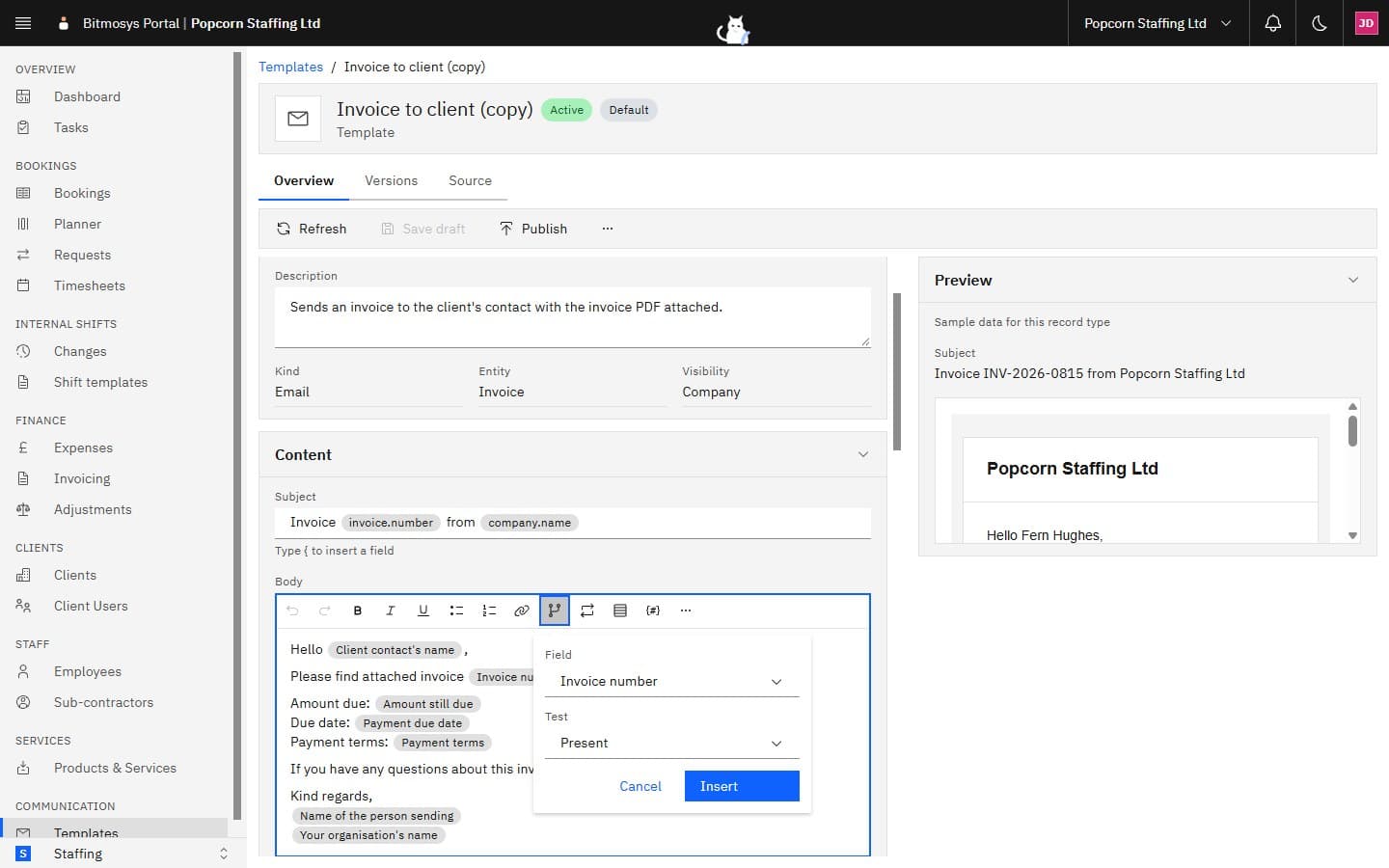
Put the cursor where the block should go and click Condition. The popover asks for:
- Field — the field to test, from the same groups as the field picker.
- Test — Present (the field has a value), Blank (it doesn't), Equals, Not equals, Greater than or Less than.
- Value — for the last four tests, what to compare against: up to 200
characters on one line, without
<,>, braces or%. A number compares as a number; anything else as text.
Click Insert. The block appears as a bordered group with a header that reads back what it does — If Invoice number is present — and Edit and Remove controls. Write inside it as you would anywhere else; the contents appear in the message only when the test passes, and leave no trace when it doesn't.
Typical uses: a paragraph that mentions the client's PO number only when the invoice has one; a "Staff: …" line only once a worker is assigned to a booking.
Repeat blocks
Click Repeat to repeat a block of content for every item in a list. The popover asks for:
- Repeat for each item of — a list field for the record type: Invoice lines on an invoice, Staff on the booking on a booking.
- Name each item — the name the fields inside the block use (prefilled, for example line). Fields inside the block read as this name.
Click Insert. The header reads For each Invoice lines as line. Inside the block, the field picker gains a group for the item — Each invoice line — with the item's own fields: line description, quantity, unit price and line total. Write one row's worth of content once; the message repeats it per item.
A condition block can sit inside a repeat block (show a line's reference only when it has one). A repeat block can't sit inside another repeat block, and blocks nest at most three levels deep. Long lists are capped at 200 items.
Tables
Click Table to insert a two-by-two table with a header row. While the cursor is in a table, a small bar appears with Add row, Add column, Delete row, Delete column and Delete table. Cells hold ordinary text and fields.
How blocks read in plain text
Every email has a plain-text version for mail clients that don't show HTML.
There, a condition block shows its contents or nothing; a repeat block shows
its contents once per item; and a table becomes one line per row with |
between the cells. The Preview shows the HTML version; the Source tab
shows both.