Fields reference
Every field a template can use, by record type, plus the Field usage check.
A field's label is what you see in the picker and on the chip; its key (shown on hover, and in the Source tab) is how it's written in Liquid. Fields marked required must have a value on the record for the message to send; the compose sheet tells you when one is missing.
Fields every record type shares
Group | Field | Key |
|---|---|---|
| Your organisation | Your organisation's name (required) | company.name |
| Organisation contact email | company.email | |
| Organisation contact phone | company.phone | |
| Organisation address | company.address | |
| Organisation website | company.website | |
| Recipient | Recipient's full name | recipient.name |
| Recipient's first name | recipient.firstName | |
| Recipient's email | recipient.email | |
| Sender | Name of the person sending | sender.name |
| Email of the person sending | sender.email | |
| Dates | Today's date | dates.today |
The recipient is whoever the message goes to — the client's contact for an invoice or booking, the worker for a timesheet. The sender is the person pressing Send.
Invoice
Group | Field | Key |
|---|---|---|
| Invoice | Invoice number (required) | invoice.number |
| Invoice date | invoice.issueDate | |
| Payment due date | invoice.dueDate | |
| Current status | invoice.status | |
| Currency | invoice.currency | |
| Subtotal before tax | invoice.subtotal | |
| Tax | invoice.tax | |
| Invoice total (required) | invoice.total | |
| Amount still due | invoice.amountDue | |
| Payment terms | invoice.paymentTerms | |
| Client's reference (PO number) | invoice.reference | |
| Invoice lines (list) | invoice.lines | |
| Client | Client organisation name | invoice.client.name |
| Client contact's name | invoice.client.contactName | |
| Client contact's email | invoice.client.email | |
| Client contact's phone | invoice.client.phone |
Invoice lines is a list for a Repeat block. Each line has Line description, Quantity, Unit price and Line total.
Timesheet
Group | Field | Key |
|---|---|---|
| Timesheet | Timesheet number (required) | timesheet.number |
| Current status | timesheet.status | |
| Shift date | timesheet.date | |
| Start time | timesheet.startTime | |
| End time | timesheet.endTime | |
| Time zone | timesheet.timeZone | |
| Hours worked | timesheet.hours | |
| Break (minutes) | timesheet.breakMinutes | |
| Rejection reason | timesheet.rejectionReason | |
| Approved on | timesheet.approvedAt | |
| Approved by | timesheet.approvedByName | |
| Booking | Booking number | timesheet.booking.number |
| Booking location | timesheet.booking.location | |
| Client | Client organisation name | timesheet.client.name |
| Worker | Worker's full name | timesheet.worker.name |
| Worker's first name | timesheet.worker.firstName | |
| Pay | Pay rate | timesheet.pay.rate |
| Charge | Charge rate | timesheet.charge.rate |
Times and the approval moment are in the timesheet's own time zone. Pay rate fills in only when the sender may see worker pay, and Charge rate only when they may see client commercials; otherwise the field renders blank (or its fallback).
Booking
Group | Field | Key |
|---|---|---|
| Booking | Booking number (required) | booking.number |
| Current status | booking.status | |
| Booking location | booking.location | |
| Shift date | booking.date | |
| Start time | booking.startTime | |
| End time | booking.endTime | |
| Time zone | booking.timeZone | |
| Duration (hours) | booking.durationHours | |
| Service | booking.service | |
| Remarks for the client | booking.remarks | |
| Assigned staff member | Assigned staff member's name | booking.worker.name |
| Staff on the booking | Staff on the booking (list) | booking.workers |
| Client | Client organisation name | booking.client.name |
| Client contact's name | booking.client.contactName | |
| Charge | Charge rate | booking.charge.rate |
Remarks for the client is the booking's client-facing remarks only — the staff-only additional information, parking details and pricing breakdown never reach a template. Assigned staff member's name is empty on an open shift (give it a fallback such as to be confirmed). Staff on the booking is a list for a Repeat block — the booking's worker and the workers on its linked bookings, each with a Staff member's name. Charge rate fills in only when the sender may see client commercials.
Field usage
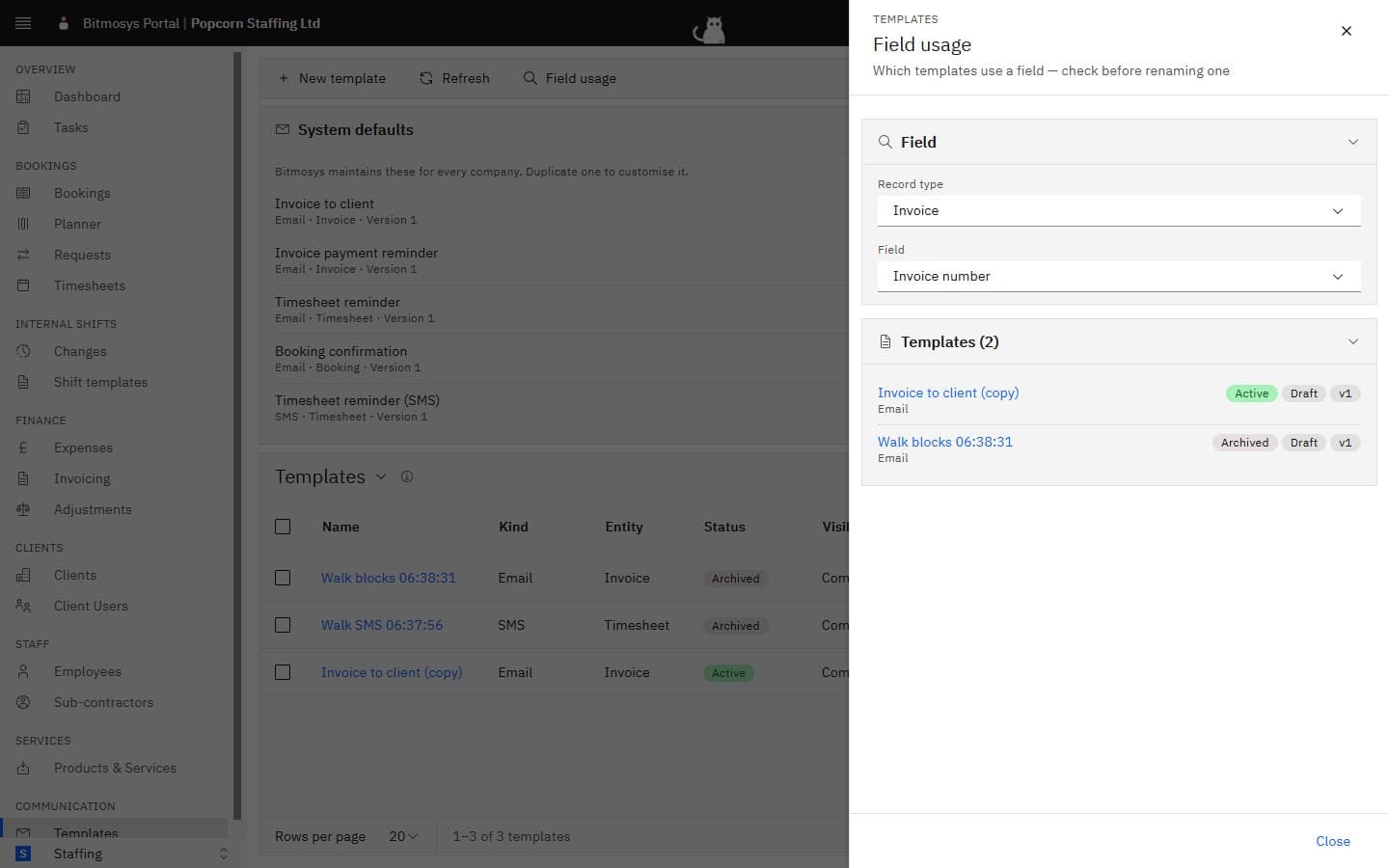
Before you change how you use a field — or ask Bitmosys to rename one — check where it's used. Click Field usage on the Templates page, choose the Record type and the Field, and the sheet lists every template of yours that mentions it, with its status, a Draft chip when the unpublished draft uses it, and a chip per published version that does (v1, v2…). Click a name to open the template.